Mean-centred analysis of volume source data#
This example demonstrates how we to use mean-centred PLS to identify condition-wise differences in source time courses in a volumetric source space.
Loading data#
We will begin by loading the sample data and extracting epochs corresponding to auditory stimuli presented to the left versus right ear.
[1]:
import mne
from mne.datasets import sample
from mne.minimum_norm import apply_inverse, apply_inverse_epochs, read_inverse_operator
import mne_plsc

data_path = sample.data_path()
meg_path = data_path / "MEG" / "sample"
fname_raw = meg_path / "sample_audvis_filt-0-40_raw.fif"
fname_event = meg_path / "sample_audvis_filt-0-40_raw-eve.fif"

# Load data
raw = mne.io.read_raw_fif(fname_raw)
events = mne.read_events(fname_event)

# pick MEG channels
picks = mne.pick_types(
    raw.info, meg=True, eeg=False, stim=False, eog=True, exclude="bads"
)
# Read epochs
epochs = mne.Epochs(
    raw,
    events,
    event_id={'left': 1, 'right': 2},
    tmin=-0.2, tmax=0.5,
    picks=picks,
    baseline=(None, 0),
    reject=dict(mag=4e-12, grad=4000e-13, eog=150e-6),
    preload=True,
    verbose=False
)
# Crop to a small window for speed
epochs = epochs.crop(tmin=0.05, tmax=0.1)
Opening raw data file /home/docs/mne_data/MNE-sample-data/MEG/sample/sample_audvis_filt-0-40_raw.fif...
    Read a total of 4 projection items:
        PCA-v1 (1 x 10²)  idle
        PCA-v2 (1 x 10²)  idle
        PCA-v3 (1 x 10²)  idle
        Average EEG reference (1 x 60)  idle
    Range : 6450 ... 48149 =     42.956 ...   320.665 secs
Ready.
Computing volume source estimate#
Next, we will load the pre-computed inverse operator for the sample dataset and apply it to the epochs. This yields a list of source time courses (STCs).
[2]:
fname_inv = meg_path / "sample_audvis-meg-vol-7-meg-inv.fif"
inverse_operator = read_inverse_operator(fname_inv, verbose=False)

snr = 3.0
lambda2 = 1.0 / snr**2
stcs = apply_inverse_epochs(
    epochs=epochs,
    inverse_operator=inverse_operator,
    lambda2=lambda2,
    method='dSPM',
    verbose=False
)
Fitting and assessing mean-centred PLS model#
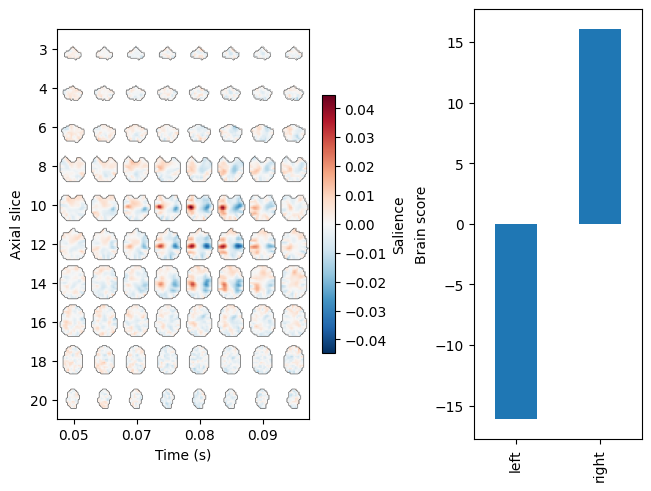
Next, we will get the labels for the epochs and use them to fit a mean-centred PLS model. In order to render a 4D image of the brain saliences, we will attach info about the source space to the model. For a volumetric source space, this means adding the VolSourceSpaces object corresponding to the inverse operator.
[3]:
labels = mne_plsc.utils.get_epoch_labels(epochs)
res = mne_plsc.fit_mc(stcs,
                      between=labels,
                      random_state=123)
res.add_source_info(src=inverse_operator['src'])
res.plot_lv(0)
Assuming time-domain source-space data. If data is actually freq- or time-freq-domain, specify this explicitly
[3]:
(<Figure size 640x480 with 3 Axes>,
 array([<Axes: xlabel='Time (s)', ylabel='Axial slice'>,
        <Axes: ylabel='Brain score'>], dtype=object))
We can assess the significance of the model using permutation testing. We will do a small number of permutations here for speed, but for real data it would be best to do many more.
[4]:
res.permute(100)
print(res.summary())
Getting permutations: 100%|██████████| 100/100 [00:00<00:00, 122712.23it/s]
Permuting: 100%|██████████| 100/100 [00:00<00:00, 238.41it/s]
   LV index  singular value  variance explained   p value
0         0       22.784547                 1.0  0.009901
1         1        0.000000                 0.0       NaN
Thus, the model has identified a significant contrast between the conditions.
Cluster analysis#
To characterize the pattern that differentiates the two conditions, we can perform cluster analysis. First, we will perform bootstrap resampling to estimate the \(z\) scores of the brain saliences.
[5]:
res.bootstrap(100)
Getting resamples: 100%|██████████| 100/100 [00:00<00:00, 6954.00it/s]
Resampling: 100%|██████████| 100/100 [00:00<00:00, 108.04it/s]
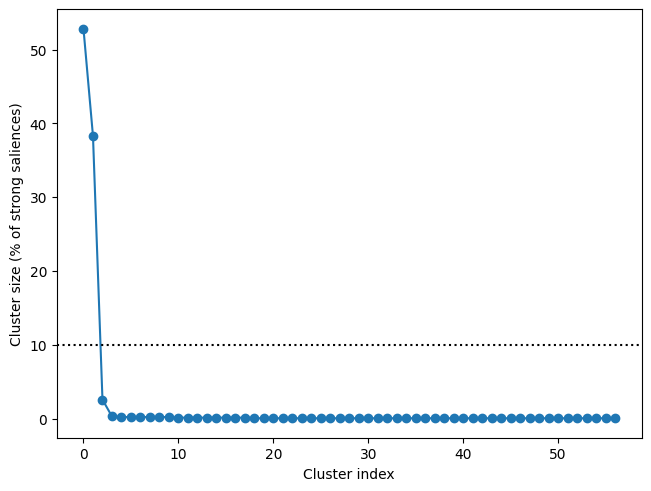
Next, we can add an adjacency matrix and compute clusters. Computing adjacency requires adding source info (via add_source_info), which we did before. As the plot below shows, there are two major clusters in the data—each other cluster accounts for less than 10% of the strong saliences.
[6]:
res.add_adjacency()
res.cluster(threshold=3)
f, ax = res.plot_cluster_sizes(lv_idx=0)
ax.axhline(y=10, c='k', ls=':')
-- number of adjacent vertices : 3757
Clustering z-scores
Defaulting to unsigned clustering
Computing clusters for lv_idx 0...
Threshold: 3
57 clusters
[6]:
<matplotlib.lines.Line2D at 0x7312e9fa8f50>
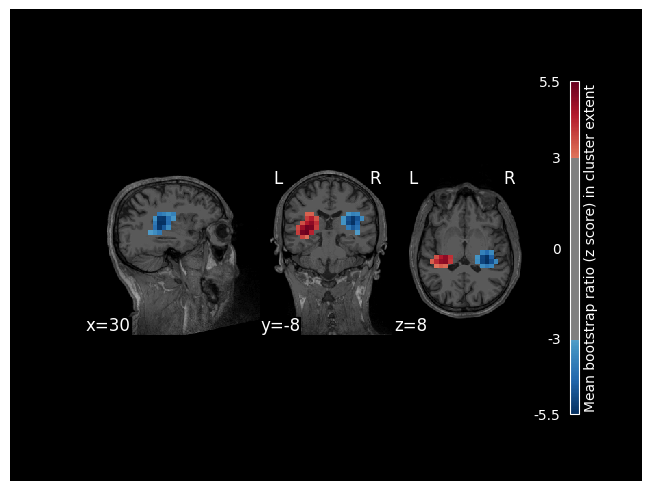
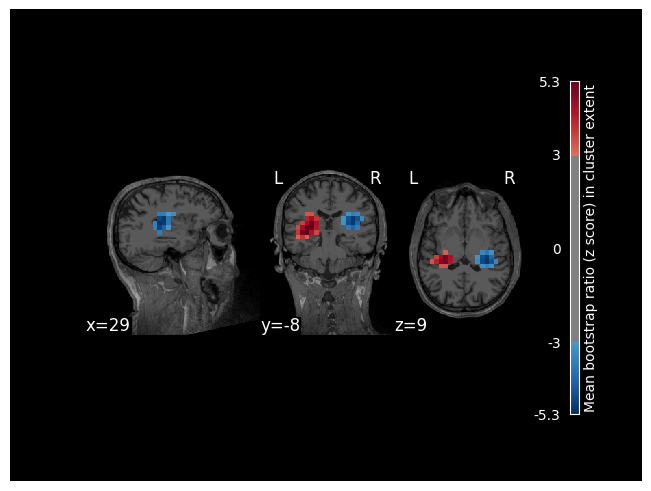
To visualize clusters, we will attach the subject’s MRI to the model (which will then be used as a background image). Visualizing these first two clusters, we can see that they overlap with the left and right auditory cortex.
[7]:
res.add_source_info(mri=data_path / "subjects" / "sample" / "mri" / "T1.mgz")
res.plot_cluster_spatial(lv_idx=0, cluster_idx=0, highlight='extent')
res.plot_cluster_spatial(lv_idx=0, cluster_idx=1, highlight='extent')
[7]:
(<Figure size 640x480 with 5 Axes>, <Axes: >)